
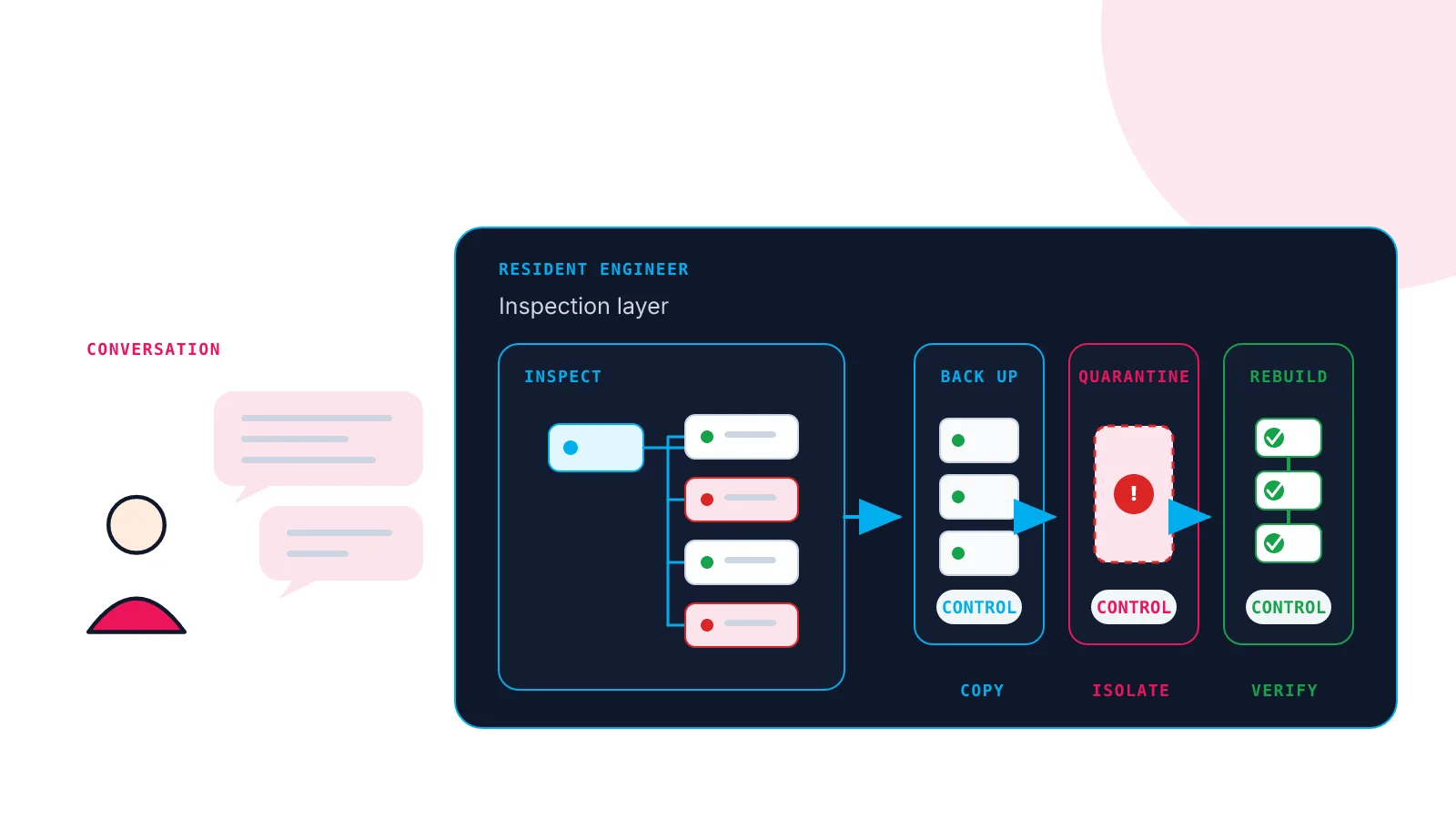
WordPress malware removal has a deceptively short checklist: scan the site, delete the malware, change the passwords and update everything.
The actual job is deciding what every result means. A strange PHP file may be malicious or part of a plugin. A backup may contain the attacker. A clean replacement theme may make half the site print raw shortcodes. Even a page that works after a refresh may still be coming from the wrong cache.
We recently worked through this on an anonymised customer site I will call ShadySite. The owner suspected an exploit and could no longer rely on normal WordPress administrator access. I gave the uploaded copy to the Woop! Host Resident Engineer, our AI agent that works inside the site’s contained server account.
The agent did the investigation and command-line work. I answered its questions, approved the consequential changes and pointed out pages that still looked wrong.
This post is an edited debrief from the recorded session. An AI agent performed the work and helped draft the article. I checked the result against the session record.
Why is WordPress malware removal difficult?
A reliable cleanup has to preserve the customer’s content while distrusting much of the code around it.
| PROBLEM | WHAT MAKES IT AWKWARD |
|---|---|
| Detection | One scanner result rarely proves what happened. File location, behaviour, checksums and account history all matter. |
| Removal | Deleting too little leaves a backdoor. Deleting too much can remove the design, forms or content ownership. |
| Commercial code | Public WordPress packages have checksums. Paid themes and plugins often need a fresh vendor package instead. |
| Verification | “Clean”, “working” and “ready to launch” are separate results. |
The audit summary below is edited from the recorded results. It separates confirmed malicious code from suspicious or unexplained findings. It did not establish how the attacker first entered the site.
+----------------------------------------------------------------+
| SECURITY AUDIT - EDITED RESULTS                                |
| CONFIRMED  uploads/wp/<random>.php - executable malware        |
| CONFIRMED  plugins/background-image-cropper/ - loaders         |
| CONFIRMED  languages/<random>.php - obfuscated loader          |
| SUSPICIOUS random PHP in theme and converter directories       |
| INTEGRITY  core failed; 28 plugins failed; 20 unverifiable     |
| CONFIG     unexpected .htaccess files across plugin trees      |
| ACCOUNTS   six imported administrators; one high-risk          |
| DATABASE   43 current tables plus 18 legacy tables             |
| DATABASE   orphaned plugin cron hooks remained                 |
| SQL CHECK  no dangerous statements or DEFINER clauses          |
|                                                                |
| CONCLUSION compromise confirmed; original entry unknown        |
+----------------------------------------------------------------+
ShadySite also depended on a commercial theme and page builder whose imported copies came from the compromised site.
That is enough complexity to turn a hurried cleanup into several days of shell commands, notes and judgement calls.
What did I have to do?
I mostly described the outcome I wanted and approved the points where the agent could destroy or replace data.
One of the destructive decisions looked like this:
+----------------------------------------------------------------+
| CLEANUP APPROVAL - EDITED TRANSCRIPT                           |
+----------------------------------------------------------------+
| peter> Proceed. Reset all administrator passwords.             |
| Trust none of them. I can add a new administrator later.       |
|                                                                |
| resident-engineer> No imported administrator is trusted.       |
| I will preserve authored content, remove all six accounts,     |
| and destroy their sessions.                                    |
+----------------------------------------------------------------+
Later, after I supplied a fresh licensed theme package, I pointed out pages that still looked wrong. When the work was ready for customer review, I asked the agent for a short handoff.
Behind those few messages, the Resident Engineer preserved evidence, created backups, inspected files and database records, rebuilt WordPress, restored the design and checked the rendered pages.
That is the useful change. The recovery remains technically difficult, but using the recovery process feels like a conversation rather than a private collection of commands and checklists.
What did the AI agent do with the infected site?
The Resident Engineer first treated the uploaded copy as evidence rather than a working website.
It kept the site in maintenance and staging modes, blocked outbound WordPress email, disabled scheduled WordPress tasks and took a protected backup before replacement work. The audit then confirmed the compromise from several independent findings rather than one alarming filename.
The agent quarantined the imported plugin and theme code outside the webroot. It removed all six imported administrators after reassigning their content to a non-administrator account. It installed WordPress core from an official package and required the core checksum test to pass.
For the full receiving and containment sequence, see how we migrated the hacked WordPress site safely.
How did the agent restore the design without restoring the malware?
It used the fresh licensed theme bundle I supplied and added only the components the site’s content showed it needed.
Before changing the site, the Resident Engineer inspected the package outside the webroot and took another protected restore point. It installed each theme or plugin separately, checked its PHP syntax and confirmed that the staging site still responded after activation.
The first pass restored the main layout, page builder and contact form. Browser checks then exposed some missing form controls, so the agent found maintained WordPress.org replacements and tested those as well.
This was much safer than copying the old plugin directory back into place. A ZIP file opening successfully proves that it is readable. It does not prove that code taken from an exploited site is trustworthy.
What other problems appeared during the rebuild?
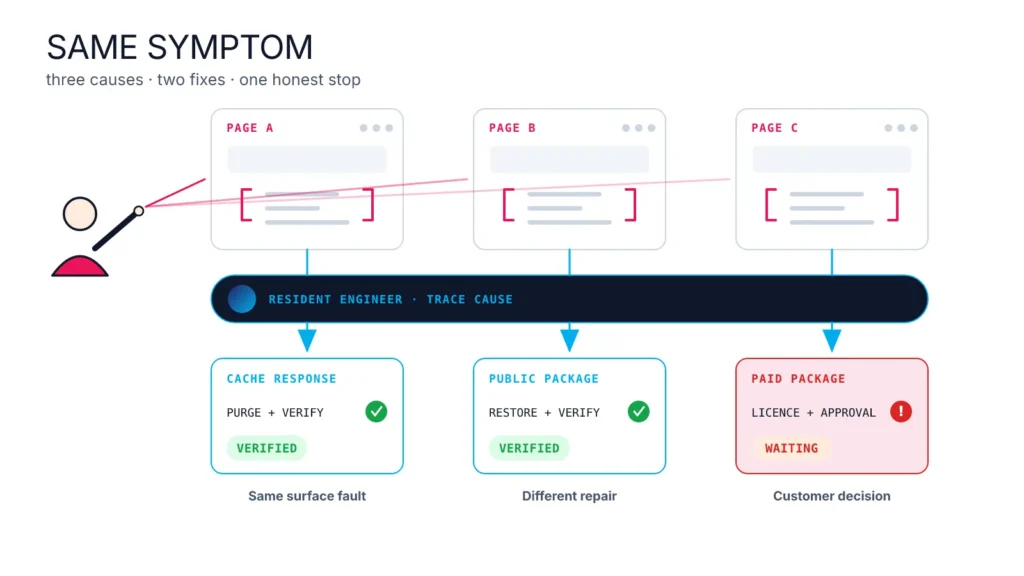
The remaining faults looked similar in the browser but had different causes.
+----------------------------------------------------------------+
| CACHE OR MISSING CODE? - EDITED TRANSCRIPT                     |
+----------------------------------------------------------------+
| peter> This page shows raw code. A refresh clears it.          |
| Is there a general cache flush that needs to occur?            |
|                                                                |
| resident-engineer> The page-builder output is stale            |
| Varnish. The other raw tags are missing-plugin                 |
| dependencies, not cache. I will handle them separately.        |
+----------------------------------------------------------------+
One page displayed raw page-builder code until it was refreshed. The agent compared cached and fresh responses and found stale host-level Varnish content. Clearing the WordPress object cache was not enough because Varnish is a separate cache.
Other raw tags were not cache problems at all. They belonged to missing plugins:
- an optional portfolio component inside the licensed theme bundle;
- a maintained WordPress.org tracking plugin;
- a paid reviews plugin that was not available from a clean source;
- one Facebook tracking feature present only in the paid version of another plugin.
The agent installed the clean packages it could verify. It refused to reactivate the quarantined commercial plugin. The customer is able to supply the remaining licensed packages later.
Was the WordPress site recovered?
The main site is clean and working on staging, with a short list of customer actions before launch.
At handoff:
- WordPress core checksums passed;
- no PHP remained under uploads and the final known-loader scan had no hits;
- the fresh licensed theme, page builder, portfolio and form components were active;
- the main layout, forms and representative page types were inspected at desktop, tablet and mobile sizes;
- stale schedules from quarantined plugins had been removed;
- a new known administrator had been created for the customer.
The reviews widget still needs a fresh paid Business Reviews Bundle package. Facebook click-ID tracking needs the paid HandL package or removal of that one form tag. Those two tags remain visible on the affected content. Search indexing, outbound WordPress email and WordPress cron remain restricted while the site is on staging.
The Resident Engineer turned that state into a short client handoff: what was cleaned, what was restored and what the customer still needs to provide. The forensic detail remains available without making the customer read all of it.
What does the AI agent make easier?
It gives the operator one place to describe the problem, approve risk and check the result.
The difficult work still happens. Files need classifying, backups need checking, commercial packages need provenance, and caches have an irritating habit of making yesterday’s broken page look like today’s broken page.
I did not have to remember the commands or keep the recovery state in my head. I could upload the legitimate packages, point to a page that looked wrong, ask whether the cache needed clearing and let the agent investigate the cause.
If you have a WordPress site or export you do not trust, talk to the Woop! Host team before you run it or change DNS. We can isolate it and use the Resident Engineer to work through the recovery with you. Complex rescue work is quoted before it starts.
ShadySite is an anonymised customer case from August 2026. The conversation has been edited for length. Site names, account names, credentials, hostnames and private paths have been removed.
Woop! Host is RimuHosting’s managed WordPress hosting service. The Resident Engineer is a Woop! Host innovation.