
A normal WordPress migration tries to copy everything. That is exactly what makes migrating a hacked site risky.
The copy may include malicious PHP, an attacker’s administrator account, scheduled tasks and altered server rules. Put it directly on a public server and a technically successful migration can reproduce the compromise.
We recently migrated one of those sites. I will call it ShadySite. The owner had already spent days working through file-transfer credentials and unreliable WordPress administrator access.
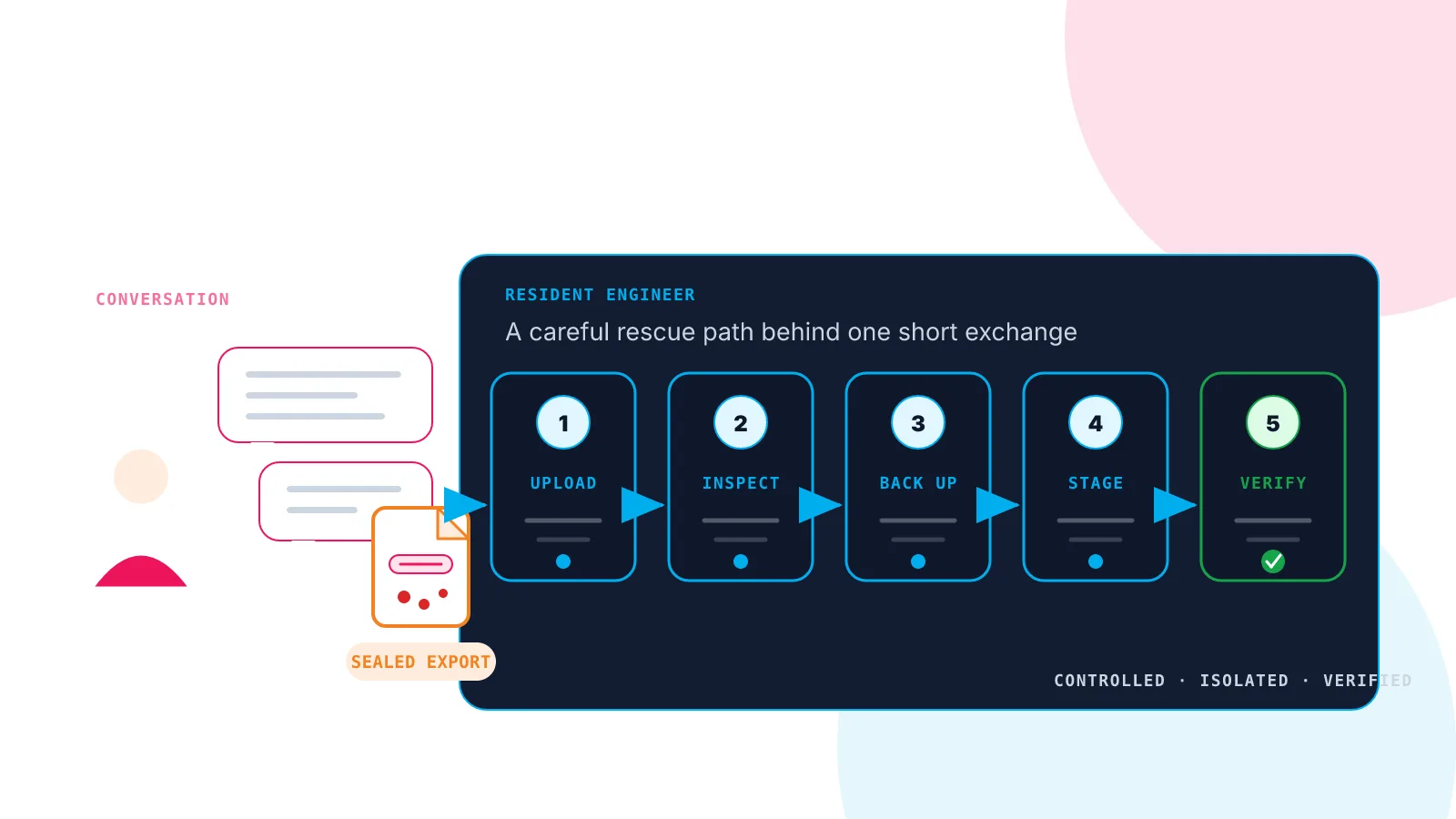
I used the Woop! Host Resident Engineer to receive the export, inspect it, import it in isolation and rebuild it from clean packages. The Resident Engineer is an AI agent working inside the site’s contained Unix account on the Woop! Host stack.
My side of the migration was mostly a short conversation.
This article is an edited debrief from the recorded session. The AI agent carried out the migration and helped draft the article. I made the decisions and checked the result against the session record.
Why is a hacked WordPress migration harder than a normal move?
A rescue migration has to preserve the website without trusting the website.
| ORDINARY MIGRATION QUESTION | EXTRA RESCUE QUESTION |
|---|---|
| Did the files arrive? | Can they be inspected without executing them? |
| Is there room to import them? | Is there also room for staging and a protected backup? |
| Did the URL change work? | Did it preserve WordPress serialised data? |
| Does the site load? | Is it clean, functional and safe to publish? |
There are plenty of other traps. Old hosting integrations can arrive inside wp-content. Imported code can send email or run scheduled tasks. Commercial themes may be essential to the design but impossible to verify without a fresh vendor copy.
The Resident Engineer kept track of those issues while asking me only for the decisions it could not make on my behalf.
What did the migration conversation look like?
It looked more like directing a capable engineer than operating a migration tool.
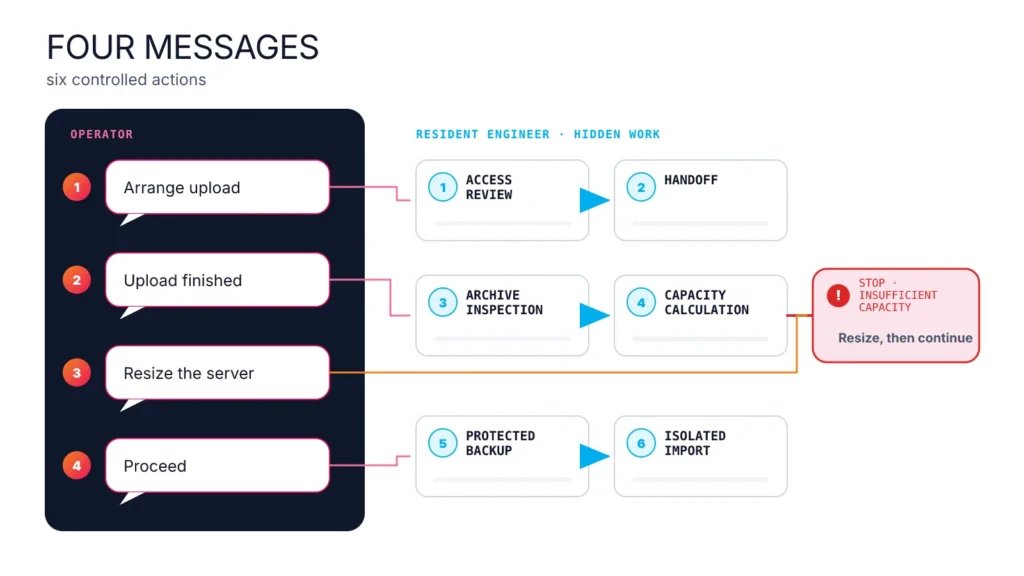
I first told the agent that someone would upload the export. It arranged temporary access, requested only the information it needed and warned us not to send private keys or database passwords.
+----------------------------------------------------------------+
| MIGRATION HANDOFF - EDITED TRANSCRIPT                          |
| resident-engineer> For a full copy, please send:               |
| - database export: db.sql or db.sql.gz                         |
| - wp-content archive: tar.gz or zip                            |
| - SHA256SUMS if available                                      |
| Also include the source URL, table prefix, exclusions,         |
| and whether the site was hacked, defaced or sending spam.      |
|                                                                |
| peter> Upload finished. Full copy. Site was hacked/defaced.    |
|                                                                |
| resident-engineer> Received db.sql.gz and files.tar.gz.        |
| Both compressed streams are readable. No checksum file.        |
| Nothing has been imported or overwritten.                      |
+----------------------------------------------------------------+
After inspecting the uploaded copy without running it, the agent proposed the import plan:
+----------------------------------------------------------------+
| IMPORT PLAN - EDITED TRANSCRIPT                                |
+----------------------------------------------------------------+
| resident-engineer> Recommended profile: full clone into        |
| staging. Replace the customer database and wp-content,         |
| preserve the destination's managed components, and keep        |
| search, email and cron protections active.                     |
|                                                                |
| After import: security audit before go-live. Please confirm.   |
|                                                                |
| peter> Confirmed.                                              |
| resident-engineer> Protected backup first, then staging.       |
+----------------------------------------------------------------+
The Resident Engineer then took a protected files-and-database backup before it changed the destination.
What did the agent check before importing the site?
It inspected the archive and database without running the imported WordPress code.
The preflight checked that the compressed files were readable, archive paths could not escape their inspection directory, the SQL had no dangerous server-level statements, and the destination backup could complete. It also inventoried 61 database tables and about 50 plugin directories.
One randomly named PHP file in the theme area supported the customer’s suspicion, but the agent did not treat one filename as a complete diagnosis.
It proposed a full-clone import into staging, with the destination’s managed hosting components preserved. I replied:
Peter: “Confirmed.”
The agent took a protected files-and-database backup. It then imported the site under maintenance mode, blocked outbound WordPress email, disabled scheduled WordPress tasks and discouraged search indexing.
Was changing the site address complicated?
The agent made it a question I could answer without knowing the WP-CLI syntax.
A dry run found 10,591 stored references to change from the public address to the staging address.
+----------------------------------------------------------------+
| URL REPLACEMENT APPROVAL - EDITED TRANSCRIPT                   |
+----------------------------------------------------------------+
| resident-engineer> Dry run: 10,591 replacements.               |
|                                                                |
| peter> What are URL replacements? Examples?                    |
|                                                                |
| resident-engineer> Stored page, media and settings links.      |
| Email addresses remain unchanged. The update uses              |
| serialisation-safe handling.                                   |
|                                                                |
| peter> Proceed.                                                |
| resident-engineer> Applied. Follow-up dry run:                 |
| zero old HTTPS references remain.                              |
+----------------------------------------------------------------+
The Resident Engineer explained that the changes were stored links rather than browser redirects. WordPress stores some values in a serialised format, so a blind database replacement can corrupt them. The official WordPress migration guide recommends serialisation-aware tools such as WP-CLI search-replace.
The agent applied the change and checked for remaining production references.
What did the migration uncover?
The imported site worked well enough to inspect, and the security audit then confirmed that it was compromised.
The agent found executable PHP in uploads, obfuscated loaders, altered code and an administrator the owner did not trust. The site stayed in maintenance mode and moved into the separate WordPress malware-removal workflow.
This is an important boundary. A readable archive proves that the transfer is readable. A completed import proves that the copy exists. Neither result proves that the site is safe.
How did we get from a clean baseline to a working site?
I uploaded a fresh licensed copy of the commercial theme, then the Resident Engineer did the rebuild.
It inspected the vendor bundle, took a restore point and mapped the site’s stored shortcodes to the minimum theme and plugin components they required. It installed those components one at a time and checked the site after each activation.
The main design came back, but the visual checks found some raw form and portfolio tags. The agent installed clean maintained dependencies where they were available. I later spotted another page that displayed page-builder code until it was refreshed and asked whether the cache needed clearing.
The agent separated three similar-looking problems:
- stale host-level Varnish content;
- a missing component inside the licensed theme bundle;
- features belonging to paid plugins that we did not have from a clean source.
It added a cache-purge integration and the verifiable missing components. It did not reactivate quarantined code or download commercial software from an unofficial source.
This is the sort of tail that makes migrations drag on. Instead of diagnosing cache headers and shortcode ownership myself, I pointed to the affected page and asked the obvious question.
What work did the person do, and what did the AI do?
I supplied access, approvals, legitimate packages and the final visual judgement. The Resident Engineer handled the procedure.
| PETER | RESIDENT ENGINEER |
|---|---|
| Arranged the export and supplied access. | Checked access, archives and SQL before import. |
| Confirmed the import and URL change. | Backed up, staged, imported and verified the change. |
| Supplied the licensed theme. | Restored the minimum clean theme and plugin stack. |
| Pointed out pages that looked wrong. | Distinguished cache faults from missing dependencies and licence gaps. |
| Decided the site was ready for customer review. | Produced the customer handoff and remaining-action list. |
The AI did not remove the need for backups, security checks or judgement. It removed the need for me to operate every tool and hold the whole procedure in my head.
What was the result?
ShadySite now has a verified clean code baseline and a functioning staging site ready for customer review.
WordPress core checksums pass. The main theme, page-builder, portfolio and form components came from fresh official or licensed sources. The main layout and representative page types were inspected at desktop, tablet and mobile sizes. The known malware stayed quarantined outside the webroot, and a new trusted administrator was created for the customer.
Two visible paid-plugin features remain: a reviews widget and Facebook click-ID tracking. The customer can supply those licensed packages or remove the corresponding tags. Search indexing, outbound WordPress email and WordPress cron remain restricted until the customer accepts the site and Woop! Host completes the production cutover.
If you have a WordPress export from a site you suspect has been hacked, talk to Woop! Host before you run it. The Resident Engineer can receive the copy, keep it isolated and work through the migration with you. Complex rescue work is quoted before it starts.
ShadySite is an anonymised customer case from August 2026. The conversation has been edited for length. Names, accounts, hostnames, credentials, hashes and private paths have been removed.
Woop! Host is RimuHosting’s managed WordPress hosting service. The Resident Engineer is a Woop! Host innovation.

Linux, WordPress, hosting, security and website design articles from RimuHosting.