You do not need to arrive with a sitemap, a design brief and five pages of polished copy. A web designer needs an honest description of the business, the customers you want to reach, real examples of your work and a clear next step for the visitor.
These 12 questions are a guide, not a required questionnaire or a gate before work can start. Some clients are happy to answer them in writing before the first call or before the build begins. Others may only have time for a short conversation. Both approaches are fine.
We can gather missing information from the existing website, brochures, reviews, photographs and other available material, then ask focused follow-up questions as the project develops. The process adapts to the client rather than requiring every client to complete all 12 questions before work starts.
One customer essentially said, “I need you to make me a new website.” They had very little time for discovery, so our web designer Blake worked from the existing site and available material, then asked for the specific gaps as they came up. The website did not wait for a completed questionnaire; discovery happened alongside the work.
Use the questions below in whatever way helps: answer some in advance, talk through a few, or let us investigate and confirm the details during the project. Each question shows the kind of information that helps shape the website.
1. What is your business called, and what do you do?
A useful starting point is the way you would explain the business to a neighbour. The plain version is usually more useful than the version prepared for a brochure.
We need the exact trading name for the footer, but the important part is the description. What do you make, fix, supply or help with? A stranger should be able to understand it without knowing the industry.
If the name has a story that says something useful about the business, tell us. If it does not, that is fine. We do not need to manufacture one.
2. Where are you based, and where do you want work?
Useful details include the towns, suburbs or regions you cover and the places where you most want enquiries.
The answer affects the wording, contact details and search plan. “Waikato” may be technically correct while being too broad to help a customer in Cambridge decide whether you will come to their property.
Travel limits, service zones and work you only take in certain areas are also useful. A website should filter as well as attract.
3. Who is in the business, and how long have you done the work?
Useful context includes whether customers deal with you, a family team or a larger crew, and which people should appear on the site.
Relevant experience may have started before the current business name. If you spent 15 years in the trade and opened your own company last year, those are two different facts. Both can be useful when stated accurately.
Names, roles and a real team photograph often do more for trust than a paragraph claiming the business is trustworthy.
4. Which services do you offer, and which ones do you want more of?
A service list is helpful, especially when it shows which work you most want the website to bring in.
This is one of the most important distinctions in the interview. A business may be capable of 20 kinds of work while wanting more of four. If every service receives equal weight, the important ones disappear into the list.
Work you do not take is also useful to record. Clear exclusions save the owner and the customer a phone call that was never going anywhere.
5. Who is your best customer?
A useful description covers the person or organisation that is a good fit: homeowner, landlord, builder, facilities manager, another business, or a more specific group.
We are interested in the situation as well as the label. What has happened just before they contact you? What are they trying to get done? What would make the job a good one for both sides?
Good user-centred design starts with evidence about the people using the service and the task they need to complete. The GOV.UK Service Manual recommends writing needs in words users recognise and basing them on research rather than assumptions. For a small business website, the owner’s repeated customer conversations are a useful place to start.
6. How do customers find you now?
Useful clues include whether the work comes from referrals, Google, social media, a sign-written vehicle, another trade or somewhere else.
This helps us understand what the website must add. A business with steady referrals may need a place that confirms its reputation and shows recent work. A new business with no search presence has a different job to do.
If you already have analytics or Search Console data, share it. We would rather use the queries real people entered than guess what they might search for.
7. What would a customer type into Google to find you?
A useful starting point is the phrase you would use, plus the phrases customers actually use if they are different.
These may combine a service and a place, but the best answer often includes the problem: emergency repair, difficult access, a particular material, a booking need or a kind of customer. We can research the current search results later. Your wording gives that research a useful starting point.
The website should still be written for the person behind the search. Google describes useful search optimisation as something applied to people-first content, not a reason to produce pages for phrases that have little to do with the business.
8. Which other businesses do you rate or compete with?
Names are enough. We look at competitors to understand the choices customers already see, the services they expect to find and the gaps in their information that a clearer website could fill.
This is research, not a copying exercise. A competitor may have a useful page structure and completely unsuitable language. Your website still needs your facts, your priorities and your voice.
What you admire and what bothers you can both help. “Their work is excellent, but I can never find a phone number” is more useful than “I don’t like the blue.”
9. What do you already have?
Existing material may include the domain, website, business email, Google Business Profile, social accounts, logo, uniforms and vehicle signage.
We need to know what should stay, what should change and who has access. Please do not send passwords in written answers or email. We will arrange a safe handover or temporary access when it is needed.
Real-world brand material is useful. The colour on the ute that customers already recognise may be a better starting point than a fashionable palette from a design gallery.
10. What proof can the website use?
Useful proof may include reviews, relevant qualifications, awards, guarantees and examples of recognisable work that you are allowed to name.
Proof should be exact. “Fully qualified” is too vague if the qualification has a name. “Fast response” should not become “within one hour” unless the business can make and keep that promise.
If testimonials are not ready, we can identify which customers might be happy to provide one. Asking them while the project is under way is easier than leaving an empty panel in the design and hoping a quotation appears at the end.
11. What photographs are available?
Useful details include how many photographs are available, what they show and whether more can be taken.
Original files are best. A photograph downloaded from Facebook has usually been compressed and may be too small for a large website image. We also look for useful coverage: the owner or team, work in progress, finished results, equipment, vehicles and details a customer would care about.
Real photographs provide evidence and texture. A stock photograph of an immaculate person holding a suspiciously clean drill rarely helps a local customer recognise the business they are about to call.
12. What should the visitor do next?
The main action might be to call, text, request a quote, send photographs of the job, book a time or visit the shop.
The response promise also needs to be realistic. If you are up a tree all day, the site should not promise a reply within an hour. It can say when people normally hear back and collect enough information to make that reply useful.
This answer determines the main button, the form fields and the information placed beside them. A website can have several contact methods, but one should be the obvious next step.
How can we gather the answers?
A short conversation may be enough to begin. We go deeper where something useful or unclear emerges, and ask the remaining questions as focused follow-ups while content and design take shape.
We may ask:
- Tell us about a job you are proud of. What made it difficult or satisfying?
- What do customers worry about before they hire someone in your trade?
- What questions do you answer every week?
- When you win a job over another business, what reason does the customer give?
- What do customers compliment that you take for granted?
- What should the website never say or look like?
- What may change in the next year that the site should leave room for?
If a longer conversation is useful, we record it with your permission. The transcript helps us preserve the phrases you use naturally. If time is short, we capture what we can, work from existing material and follow up only on the gaps that matter.
What if you do not know every answer?
“I don’t know yet” is a useful answer at any stage. You do not need every fact or decision before we start; the answer simply shows where more discovery is needed.
Before asking the client, we look for answers in the existing website, brochures, reviews, photographs, business listings and other available material. We only follow up on information we cannot verify.
We keep three kinds of gaps visible during the project:
- a fact to verify, such as the exact year or service boundary;
- an idea to confirm, such as whether to offer a particular guarantee;
- an asset still to collect, such as a team photograph or review.
We track each gap until it is resolved. Some are answered through research or existing material; others need a short follow-up question or approval during the project. AI does not get permission to smooth over missing facts.
What is useful if you already have it?
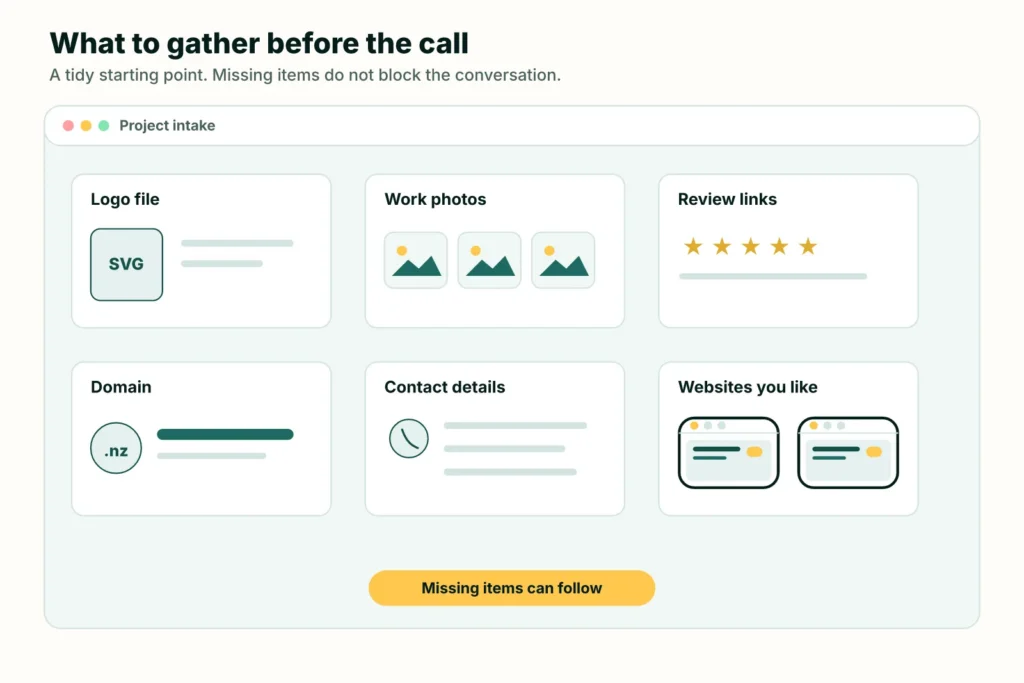
If these are already handy, they give us a useful start:
- your logo in the best format you have;
- original photographs of the work, team, vehicle or premises;
- links to reviews and your Google Business Profile;
- the domain name and the name of the company managing it;
- the exact phone number, email address and service area for the site;
- examples of websites you like or dislike, with the reason.
Do not delay the first conversation or the build because any of these are missing. We can work from the existing site and other available material, create an asset list, and request only the specific items the project still needs.
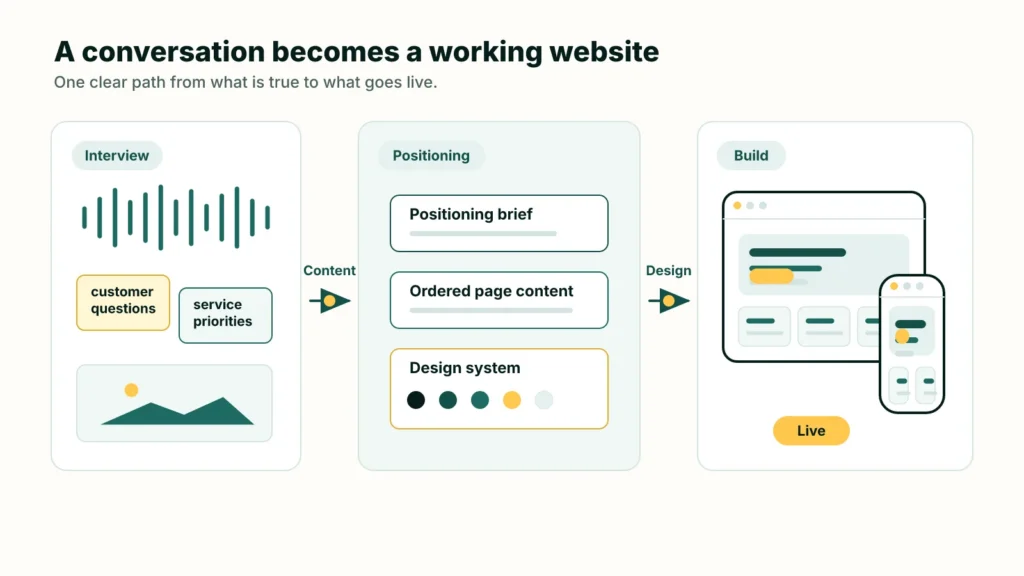
The information we gather—whether from written answers, a short conversation, existing material or follow-up questions—becomes a positioning brief, then the website content, then the design. The full website design process from interview to launch shows how those stages connect. If you are curious about the tools, read how we compare an AI website builder, a web designer and an AI-assisted agency.
WebAddress is RimuHosting’s website design and managed hosting service.
Or tell WebAddress you need a new website, even if that is all you have time to say. We will work out the next useful step from there.